• Privacy
  • Advertise
  • Refund Policy
  • Terms of Service
  • Credits
  • DMCA
  • Help & FAQ
Cleodesktop
  • Home
  • Windows 11 Themes
    • Windows 11 Dark Themes
    • Windows 11 Light Themes
  • Windows 10 Themes
    • Windows 10 Dark Themes
    • Windows 10 Light Themes
    • Windows 10 Aero Themes
  • Aero Glass
  • Sierrachart
  • Contact
  • Request
  • DONATE
UxThemePatcherWindows 11 Themes

How to Load a specific theme in Windows 11/10

by Cleodesktop 01/17/2025
written by Cleodesktop 01/17/2025
UxThemePatcher Guide To Installing Theme For Windows 11
2.7K

You can load a specific theme Windows 11 and Windows 10 with the help of this guide. It is possible to force the theme for new users using the Local Group Policy Editor and the Registry Editor. Here we have mentioned both steps and you can follow any of them to turn on this setting.

How to Load a specific theme for new users in Windows
How to Load a specific theme for new users in Windows 11/10

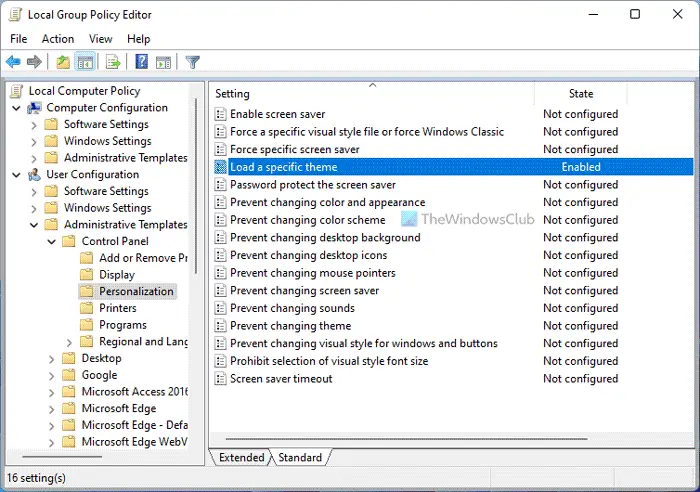
To do so, type gpedit.msc in start search and hit Enter to open the Group Policy Editor.

Navigate to

User Configuration > Administrative Templates >  Control Panel > Personalization

Now in the right pane, double click on Load a specific theme.
How to Load a specific theme for new users in Windows 11/10

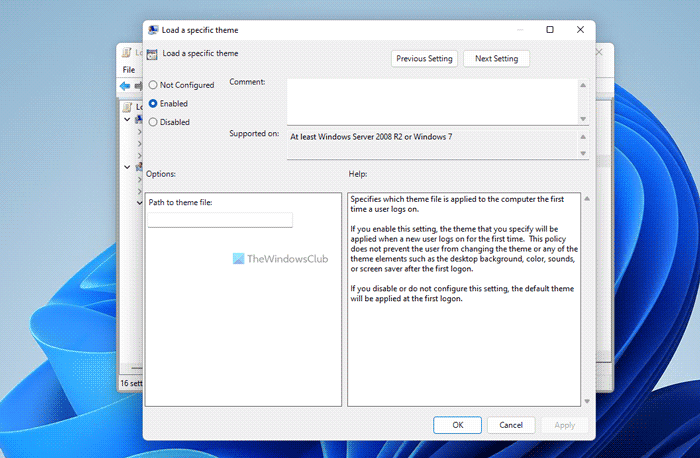
A new window will open. Select Enabled and enter the path of the .theme file you’d like to load, in the Options box.

Specifies which theme file is applied to the computer the first time a user logs on.

If you enable this setting, the theme that you specify will be applied when a new user logs on for the first time. This policy does not prevent the user from changing the theme or any of the theme elements such as the desktop background, color, sounds, or screen saver after the first logon.

If you disable or do not configure this setting, the default theme will be applied at the first logon.

Themes are located in C:\Users\Username\AppData\Local\Microsoft\Windows\Themes\ folder.

Click Apply > OK.

This setting specifies which theme file is applied to the computer the first time a user logs on.

If you enable this setting, the theme that you specify will be applied when a new user logs on for the first time.  This policy does not prevent the user from changing the theme or any of the theme elements such as the desktop background, window color, sounds, or screen saver after the first logon.

How to Load a specific theme for users using Registry

To load a specific theme for users using Registry Editor, do the following:

  1. Press Win+R to open the Run prompt.
  2. Type regedit > click the OK button > click the Yes button.
  3. Navigate to Personalization in HKCU.
  4. Right-click on Personalization > New > String value.
  5. Name it as ThemeFile.
  6. Double-click on it and set the Value data as the theme file.
  7. Click the OK button and restart the PC.

To learn more about these steps, continue reading.

First, you need to open the Registry Editor on your computer. For that, press Win+R to open the Run prompt, type regedit, hit the Enter button, and click the Yes option in the UAC prompt.

Once it is opened, navigate to the following path:

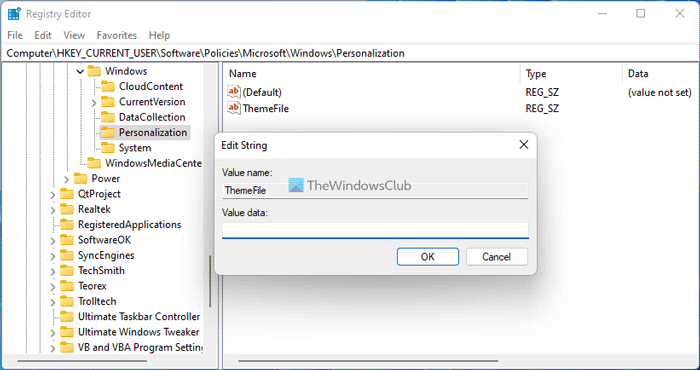
HKEY_CURRENT_USER\Software\Policies\Microsoft\Windows\Personalization

Right-click on the Personalization > New > String Value and set the name as ThemeFile.
How to Load a specific theme for new users in Windows 11/10

Double-click on it to set the Value data as the theme file.

Click the OK button and restart your computer to get the change.

UxthemepatcherWindows 11 Themes
12 FacebookTwitterPinterestLinkedinTumblrVKOdnoklassnikiRedditStumbleuponWhatsappTelegramLINEPocketViberThreadsBlueskyFlipboardOpenAIChatGPTPerplexityPerplexity AIEmail
previous post
Maloha Dark And Light Theme For Windows 11
next post
Black Red And Blue Minimalist Theme For Windows 11

You may also like

NAC Theme For Windows 11 Mod For Sierrachart

Full Dark PRO Theme For Windows 11

GRUV PINK GLASS Theme For Windows 11

Dymp Theme For Windows 11

Black White Full Glass Theme For Windows 11

Pure Black Full Theme For Windows 11

Full Darker Theme For Windows 11

Nater Dark Green Theme For Windows 11

Black Red Minimalist Theme For Windows 11

Night Dust Theme For Windows 11

UDI Theme For Windows 11

mac os 13 Ventura Dark Theme For Windows...

Leave a Comment Cancel Reply

Save my name, email, and website in this browser for the next time I comment.

Glass" Windows11" Windows10"

Keep in touch

Facebook Twitter Instagram Pinterest Linkedin Youtube Reddit Deviantart

Top Themes

  • Full Dark Theme For Windows 11

  • Mobelan Theme For Windows 11

  • MacOS Monterey Dark Theme For Windows 11

  • Pure Black Blue Theme For Windows 11

  • Black White Full Aero Glass Theme For All Windows 10

  • DDST Style Linux Theme For Windows 11

Categories

Windows 11 Windows 8 Themes UxThemePatcher Windows 7 Themes Sierrachart Alienware Windows 10 Aero Themes Classic Themes Ubuntu Themes Aero Themes XP Themes Mac Themes Combo Pack Windows 10 Light Themes Windows 11 Light Themes Windows 10 Dark Themes Linux Windows 10 Themes Minimal Themes Windows 11 Dark Themes Windows 11 Themes
My work is for my website only. It must not be distributed, published, or sold on other sites without permission from myself. Using my work from other sites is dangerous, as art thieves have the ability to install malicious code/software alongside it. For the latest in updates be sure you are getting it from here, the source on Cleodesktop.com.

Popular Posts

  • 1

    Full Dark Theme For Windows 11

  • 2

    Mobelan Theme For Windows 11

Discover more from Cleodesktop Subscribe now to keep reading and get access to the full archive.

[newsletter_form type="minimal"]

@2014 - 2026 Copyright © Cleodesktop - All Right Reserved.

This website uses cookies to ensure you get the best experience on our website. By clicking “Accept All”, you consent to the use of ALL the cookies. Learn more
Accept All
Manage consent

Privacy Overview

This website uses cookies to improve your experience while you navigate through the website. Out of these, the cookies that are categorized as necessary are stored on your browser as they are essential for the working of basic functionalities of the website. We also use third-party cookies that help us analyze and understand how you use this website. These cookies will be stored in your browser only with your consent. You also have the option to opt-out of these cookies. But opting out of some of these cookies may affect your browsing experience.
Necessary
Always Enabled
Necessary cookies are absolutely essential for the website to function properly. These cookies ensure basic functionalities and security features of the website, anonymously.
CookieDurationDescription
cookielawinfo-checkbox-analytics11 monthsThis cookie is set by GDPR Cookie Consent plugin. The cookie is used to store the user consent for the cookies in the category "Analytics".
cookielawinfo-checkbox-functional11 monthsThe cookie is set by GDPR cookie consent to record the user consent for the cookies in the category "Functional".
cookielawinfo-checkbox-necessary11 monthsThis cookie is set by GDPR Cookie Consent plugin. The cookies is used to store the user consent for the cookies in the category "Necessary".
cookielawinfo-checkbox-others11 monthsThis cookie is set by GDPR Cookie Consent plugin. The cookie is used to store the user consent for the cookies in the category "Other.
cookielawinfo-checkbox-performance11 monthsThis cookie is set by GDPR Cookie Consent plugin. The cookie is used to store the user consent for the cookies in the category "Performance".
viewed_cookie_policy11 monthsThe cookie is set by the GDPR Cookie Consent plugin and is used to store whether or not user has consented to the use of cookies. It does not store any personal data.
Functional
Functional cookies help to perform certain functionalities like sharing the content of the website on social media platforms, collect feedbacks, and other third-party features.
Performance
Performance cookies are used to understand and analyze the key performance indexes of the website which helps in delivering a better user experience for the visitors.
Analytics
Analytical cookies are used to understand how visitors interact with the website. These cookies help provide information on metrics the number of visitors, bounce rate, traffic source, etc.
Advertisement
Advertisement cookies are used to provide visitors with relevant ads and marketing campaigns. These cookies track visitors across websites and collect information to provide customized ads.
Others
Other uncategorized cookies are those that are being analyzed and have not been classified into a category as yet.
SAVE & ACCEPT
Cleodesktop
  • Home
  • Windows 11 Themes
    • Windows 11 Dark Themes
    • Windows 11 Light Themes
  • Windows 10 Themes
    • Windows 10 Dark Themes
    • Windows 10 Light Themes
    • Windows 10 Aero Themes
  • Aero Glass
  • Sierrachart
  • Contact
  • Request
  • DONATE